Emerging Web Trends M3 Part 2: Artifical Intelligence Implementation
Innovation and expansion of skills are demonstrated in project.
Project demonstrates the ability to implement AI on the website. I created a chatbot that would answer questions based on a video game: Eve Online. Some questions the bot can take right now is: How are you? What is EVE Online? What are the main factions in EVE Online? What is the origin of the Capsuleers? Are the number of Capsuleers equal to the number of players? Are there still humans who are not clones? What is the role of the Sisters of EVE?
You can view the chatbot here!
Project and code is 100% functional
Project is fully functional and meets all requirements. It was tested on Firefox and Opera GX web browsers.
Tutorial: Building an EVE Online Universe Chatbot with HTML and JavaScript
This tutorial will guide you through the process of creating a chatbot that can answer questions for EVE Online using HTML, CSS, and JavaScript.
Prerequisites
- Basic understanding of HTML, CSS, and JavaScript.
- A text editor (like Visual Studio Code, Sublime Text, or Notepad++).
- A web browser to test your chatbot.
Step 1: Setting Up the HTML Structure
Create a new HTML file and add the following basic structure: 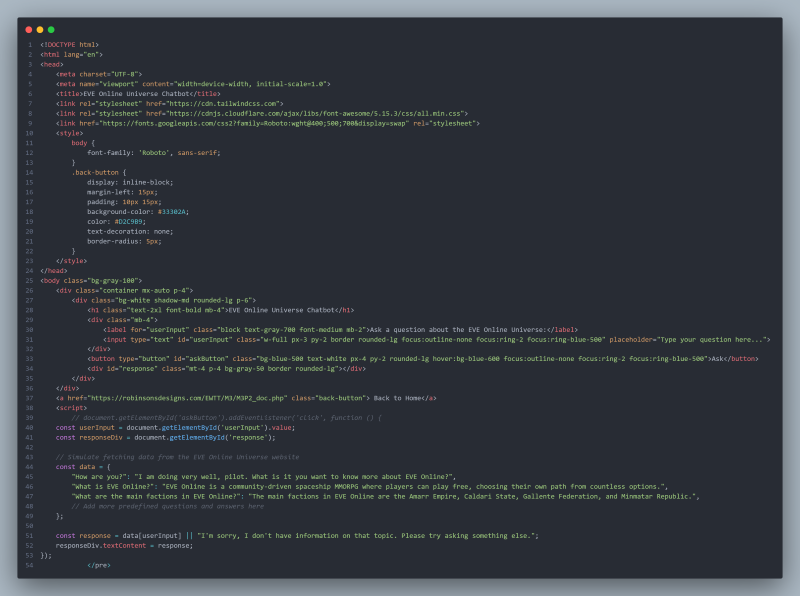
The head section includes links to Tailwind CSS for styling, Font Awesome for icons, and Google Fonts for typography. The bodycontains a simple layout with an input field for user questions, a button to submit the question, and a div to display responses.
Step 2: Adding JavaScript for Functionlity
Inside the script tag in your HTML file, add the following JavaScript code: 
This script listens for a click event on the "Ask" button. It retrieves the user's input and checks it against a predefined set of questions and answers stored in the data object. If the user's input matches a key in the data object, the corresponding response is displayed; otherwise, a default message is shown.
Step 3: Testing the Chatbot
- Open your HTML file in a web browser.
- Type a question related to the EVE Online Universe in the input field.
- Click the "Ask" button to see the response displayed below.
Example Questions
- "What is EVE Online?"
- "How are you?"
- "What are the main factions in EVE Online?"
Step 4: Enhancing the Chatbot
To make your chatbot more interactive and informative, consider the following enhancements:
- Add More Questions and Answers: Expand the data object with additional questions and answers to cover more topics within the EVE Online Universe.
- Implement a More Advanced Response System: Use natural language processing libraries or APIs to handle user input more intelligently.
- Style the Chatbot: Use Tailwind CSS classes to improve the visual appeal of your chatbot. You can customize colors, fonts, and layouts to match the EVE Online theme.
- Deploy Your Chatbot: Host your chatbot on a web server or use platforms like GitHub Pages to make it accessible to others.
Conclusion
You have successfully created a simple EVE Online Universe chatbot using HTML, CSS, and JavaScript.
Reflection
Working on this project was enjoyable and engaging. I had previously dabbled in AI for personal projects, so I was somewhat familiar with the concepts. Developing the AI chatbot for EVE Online turned out to be both a fun and educational experience. I delved into the game's lore to create a comprehensive list of potential questions and answers for players. Building the chatbot enhanced my coding skills, particularly in handling user input and crafting responses. Testing it with actual users highlighted the significance of their feedback in improving the chatbot. Overall, I take pride in the final product and look forward to further exploring AI in my future endeavors.